Monitoring
Monitoring concept
Continuous AML address monitoring is a tool for automated checks of user-specified addresses and informing the user of the increase in their risk score ( increase in % risk or address blacklisting).
Address monitoring activation
To activate automatic monitoring, a user needs to purchase a tariff plan with the "Address Monitoring" feature or contact AMLBot tech support by telegram.
AML monitoring settings
You can set the threshold value of the risk score (60% by default), the frequency of address rechecking (once every 7 days by default), as well as specify the URL for sending webhooks and the possibility to enable/disable email notifications in your personal account settings.
Monitoring logic
- An address can be added to automatic monitoring only if it has a lower risk score than the configured threshold (60% by default) and is not blacklisted. That is, if the verified address is not blacklisted and has a risk score less than 60% - it is automatically added to the monitoring. Otherwise - the address is ignored to be added to the monitoring.
- The user will be notified of an address risk score changes in the following cases:
info
- Increase in % of address risk score, compared to the maximum recorded risk within this monitoring
(if the risk moves from 10% -> 20% - the user will be notified, if the risk moves from 20% -> 10% -> 15% - the user won't be notified). Monitoring continues. - critical % risk exceeding - the address risk % has reached the threshold value or over. Monitoring stops.
- blacklisting - the address has been blacklisted. Monitoring stops.
Notifications of risk score increases
Notifications will be received:
- by email for web users, if it is set in their personal account settings.
- by webhook if it is set in the API.
Adding an address to monitoring
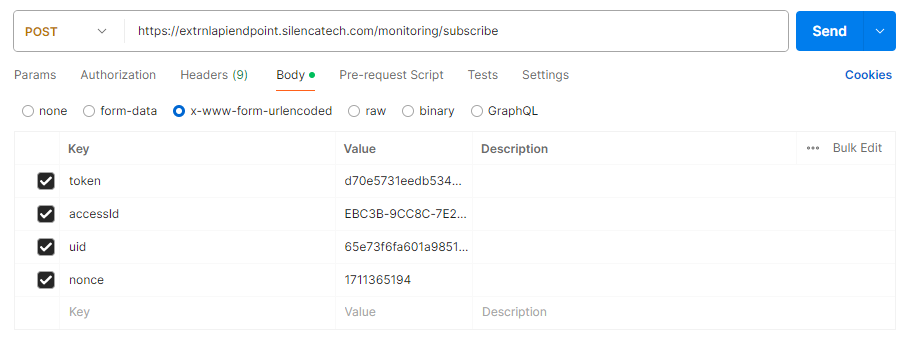
Adding an address to monitoring is possible after performing its usual AML address verification. To add an address to monitoring, you must make a request:
Request Parameters:
- Request type -
POST - Access Point:
https://extrnlapiendpoint.silencatech.com/monitoring/subscribe - Content-Type:
application/x-www-form-urlencoded - Parameters:
uid- uid from responseaccessId- User ID received in web appnonce- current timestamptoken- a signature that is generated as follows:
md5 ('N:A:T')where:
N - nonce
A - access Key
T - accessId
{
    "result": true,
    "response": {
        "riskscore": 0.216,
        "signals": {
            "atm": 0,
            "child_exploitation": 0,
            "dark_market": 0,
            "dark_service": 0,
            "enforcement_action": 0,
            "exchange_fraudulent": 0,
            "gambling": 0,
            "illegal_service": 0,
            "liquidity_pools": 0,
            "marketplace": 0,
            "miner": 0,
            "mixer": 0,
            "other": 0.003,
            "payment": 0.004,
            "ransom": 0,
            "sanctions": 0.02,
            "scam": 0,
            "seized_assets": 0,
            "stolen_coins": 0,
            "terrorism_financing": 0,
            "wallet": 0,
            "exchange": 0.945,
            "risky_exchange": 0.027,
            "p2p_exchange": 0,
            "p2p_exchange_mlrisk_high": 0,
            "exchange_mlrisk_high": 0,
            "exchange_mlrisk_low": 0,
            "exchange_mlrisk_moderate": 0,
            "exchange_mlrisk_veryhigh": 0,
            "p2p_exchange_mlrisk_low": 0,
            "fraud_shop": 0,
            "illicit_actor_org": 0,
            "high_risk_jurisdiction": 0,
            "infrastructure_as_a_service": 0,
            "lending_contract": 0,
            "decentralized_exchange_contract": 0,
            "smart_contract": 0,
            "token_smart_contract": 0,
            "protocol_privacy": 0,
            "merchant_services": 0,
            "ico": 0,
            "unnamed_service": 0,
            "special_measures": 0,
            "online_pharmacy": 0,
            "bridge": 0,
            "malware": 0,
            "nft_platform_collection": 0
        },
        "updated_at": 1711365349,
        "address": "TCbbcVXHSTNLnAT5RnXH3nGC7YTgjZhjqE",
        "fiat_code_effective": "usd",
        "counterparty": {
            "address": "TCbbcVXHSTNLnAT5RnXH3nGC7YTgjZhjqE"
        },
        "reportedAddressBalance": null,
        "addressDetailsData": {
            "created": "2023-03-28 08:47:57",
            "n_txs": 11,
            "final_n_txs": 11,
            "reported_balance_precision": 6,
            "balance": "127388682",
            "balance_approximate": 127.388682,
            "tokens": {
                "trc10": [],
                "trc20": [
                    {
                        "token_address": "TR7NHqjeKQxGTCi8q8ZY4pL8otSzgjLj6t",
                        "token_decimals": 6,
                        "token_name": "Tether USD",
                        "token_symbol": "USDT",
                        "token_logo": "https://static.tronscan.org/production/logo/usdtlogo.png",
                        "balance": "2004998",
                        "balance_approximate": 2.004998,
                        "balance_usd": 2.006209253943986
                    }
                ]
            }
        },
        "blackListsConnections": false,
        "hasBlackListFlag": false,
        "pdfReport": "#",
        "memo": null,
        "uid": null,
        "asset": "TRX",
        "network": "TRX",
        "status": 10,
        "timestamp": "2024-03-25 11:17:24",
        "flow": "fast",
        "_type": 9,
        "cost": 0
    }
}
You can see the description of the response parameters in the description of the response for AML address verification
Setting up webhook URL
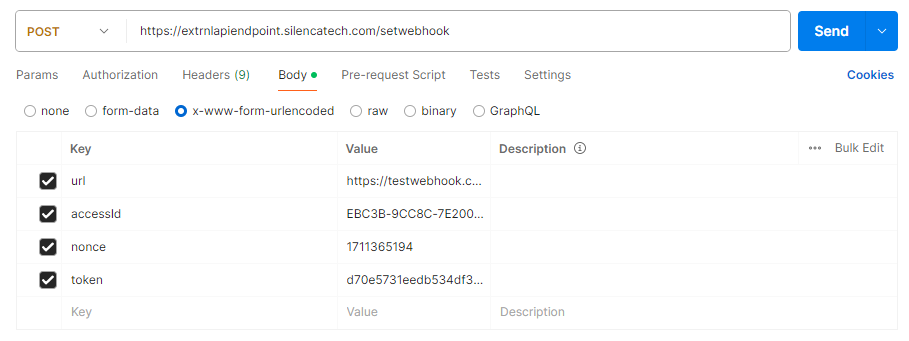
In order to receive data via webhook, the URL for receiving webhooks must be set in your personal account. You can also set a webhook URL by running the request:
Request Parameters:
- Request type -
POST - Access Point:
https://extrnlapiendpoint.silencatech.com/setwebhook - Content-Type:
application/x-www-form-urlencoded - Parameters:
- url- webhook URL
- accessId- User ID received in web app
- nonce - current timestamp
- token - a signature that is generated as follows:
md5 ('N:A:T')where:
N - nonce
A - access Key
T - accessId
{
    "result": true,
    "webhookUrl": "https://testwebhook.com/webhook.php"
}
Webhook response format
The notification format is a POST request to the specified webhook URL with data in the request body.
{
    "check": "df39d032a13b618375299d727343a789ed6cd7259fce98c1cfab2fd36d98a0c1",
    "tonce": "1711294872",
    "payload": {
        "riskscore": 0.23,
        "signals": {
            "atm": 0,
            "child_exploitation": 0,
            "dark_market": 0,
            "dark_service": 0,
            "enforcement_action": 0,
            "exchange_fraudulent": 0,
            "gambling": 0,
            "illegal_service": 0,
            "liquidity_pools": 0.004,
            "marketplace": 0.009,
            "miner": 0,
            "mixer": 0,
            "other": 0.077,
            "payment": 0,
            "ransom": 0,
            "sanctions": 0,
            "scam": 0,
            "seized_assets": 0,
            "stolen_coins": 0,
            "terrorism_financing": 0,
            "wallet": 0.024,
            "exchange": 0.772,
            "risky_exchange": 0.012,
            "p2p_exchange": 0,
            "p2p_exchange_mlrisk_high": 0.1,
            "exchange_mlrisk_high": 0,
            "exchange_mlrisk_low": 0,
            "exchange_mlrisk_moderate": 0,
            "exchange_mlrisk_veryhigh": 0,
            "p2p_exchange_mlrisk_low": 0,
            "fraud_shop": 0,
            "illicit_actor_org": 0,
            "high_risk_jurisdiction": 0,
            "infrastructure_as_a_service": 0,
            "lending_contract": 0,
            "decentralized_exchange_contract": 0,
            "smart_contract": 0,
            "token_smart_contract": 0,
            "protocol_privacy": 0,
            "merchant_services": 0,
            "ico": 0,
            "unnamed_service": 0,
            "special_measures": 0,
            "online_pharmacy": 0,
            "bridge": 0,
            "malware": 0,
            "nft_platform_collection": 0
        },
        "updated_at": 1711294871,
        "address": "0x9a957fc094ca12f15b85e7d0533a3e91732adf20",
        "fiat_code_effective": "usd",
        "counterparty": {
            "address": "0x9a957fc094ca12f15b85e7d0533a3e91732adf20"
        },
        "reportedAddressBalance": null,
        "addressDetailsData": null,
        "blackListsConnections": false,
        "hasBlackListFlag": false,
        "pdfReport": "#",
        "memo": null,
        "uid": null,
        "asset": "ETH",
        "network": "ETH",
        "status": 10,
        "timestamp": "2024-03-24 15:41:12",
        "flow": "fast",
        "_type": 9,
        "cost": 0
    }
}
payload- check result (you can see the description of the response parameters in the description of the response for AML address verification)check- HMAC_SHA256 from JSON object{ “tonce”: $tonce, “payload”: $payload }with user's accessKey as key.
info
Before processing the request on the client side, you should check that the check matches the data in the request and that the tonce falls within the +-5 second window from the current timestamp.